
El Centinela practical guide
Note: the Centinela panel inside NinjaTrader is in Spanish; the original button names are shown in brackets. The whole process from start to finish, in the order it's going to happen to you: from the test to the day it moves you up a level. If you'd rather have the full document, the PDF guide (Spanish) has the detail of every screen.
💳 Plans from $39 · mentoring with Manuel
1Get your key
Two ways in, both end with an email carrying your key JG-XXXX-XXXX-XXXX and the download link.
- Free, 5 days: take the test "How long does your plan last?". Two minutes. The 5 days start counting the day you activate the key, not today.
- Paid: pick a plan in the plans (from $39 a month). Once you pay, the email arrives in under a minute.
- If your email hasn't shown up in five minutes, check spam and, if it's not there, write to [email protected] with the email address you used.
2Install in NinjaTrader 8
- Open the download link from the email and grab the zip Centinela-vX.zip.
- Right-click the zip, Extract all. Don't run it from inside the zip.
- Double-click INSTALAR.bat. It copies the Centinela into NinjaTrader's add-on folder.
- Open NinjaTrader 8. If it was open during the install, close it and open it again: it compiles on startup.
- The panel lives under Tools → El Centinela (or Ctrl+Alt+O). It's not in the New menu.
The zip also includes the PDF guide and the uninstaller.
3Activate the license
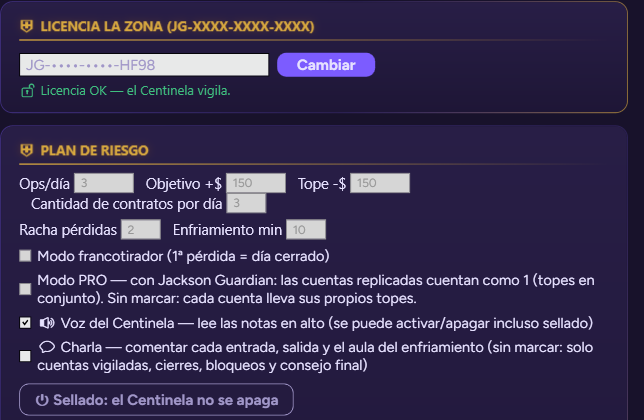
- Paste your key into the LICENSE (LICENCIA) field and press Activate (Activar).
- It has to say License OK. From then on the key shows masked (JG-••••-••••-ABCD): nobody looking at your screen can walk off with it. To change it, the Change (Cambiar) button.
The license is tied to your machine. If you switch PCs, write to support and we'll release the old one. It needs internet, with a 72-hour grace period if the connection drops.
Without a license the panel shows, but it doesn't watch. It doesn't count, doesn't lock and doesn't close the day.
4Your first plan, unsealed
This week isn't about it protecting you: it's about you seeing how it talks and what it watches.
- Under Watched accounts (Cuentas vigiladas), tick only your SIM accounts. The ones you don't tick don't exist for it.
- Under Risk plan (Plan de riesgo) pick BEGINNER. Its numbers are fixed: 3 trades and 3 contracts a day, target +$150, daily loss cap −$150, 10-minute cool-down after 2 losses.
- Turn on Voice and Chat if you want to hear it comment on your entries and exits.
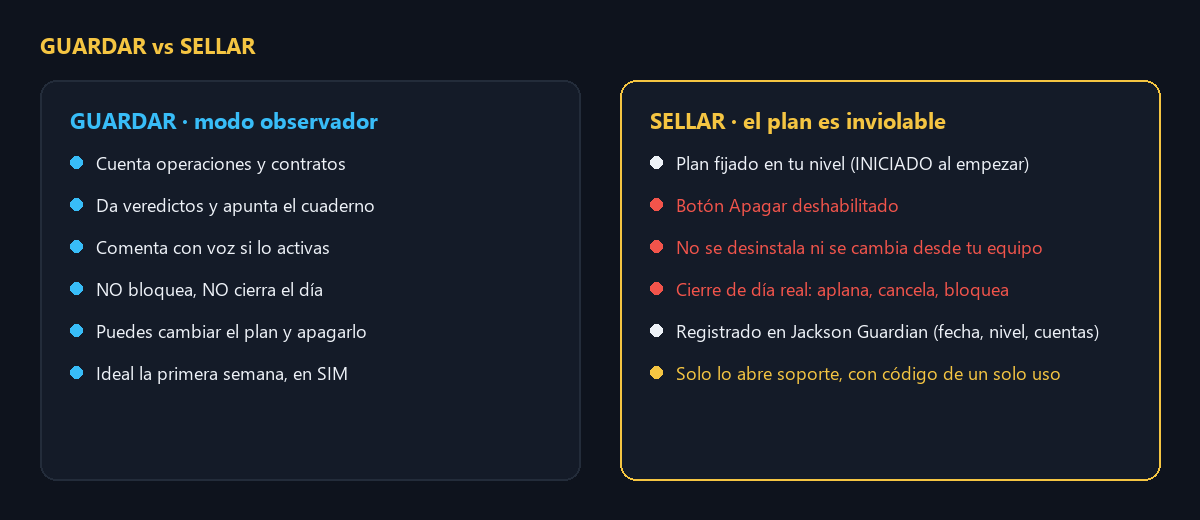
- Press Save (Guardar), not Seal. That puts it in observer mode: it comments, writes in the journal, but doesn't lock.
- Trade two or three days in SIM and read its verdicts as you close each trade.
Only the FREE PLAN lets you type in your own numbers, and only while unsealed.
5Seal
Sealing is the product's promise. Read this twice before you press it.
- The plan is locked at BEGINNER. The configuration gets signed: if anyone touches or deletes it, full lockdown until support opens it.
- The Turn off button is disabled. There's no way to deactivate it from your machine. It can't be uninstalled while sealed either.
- The watched accounts will be flattened and locked when the day closes. Unwatched ones aren't touched. If you run bots on a watched account, the close cancels their orders too.
- The seal is recorded at Jackson Guardian with date, level, plan and accounts.
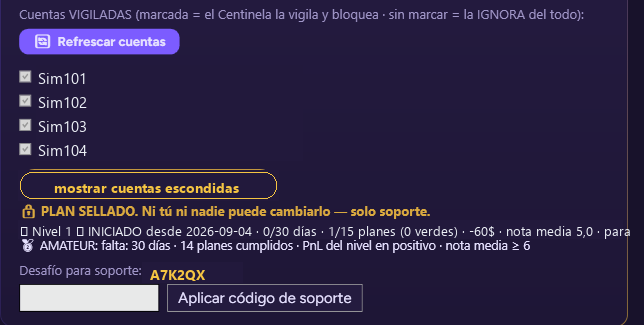
When you agree with all of it: press SEAL (SELLAR). The panel changes: the level progress and the challenge code for support appear.
✨ New in 0.28 · groups and new accounts
- Groups within one seal: each group with its own name and limits (for example, your 25K accounts with one plan and a 150K with another). With the plan already sealed you can add a new group for accounts that are not sealed yet: type its name and limits, tick the accounts and press Seal new group with the ticked accounts. What is already sealed does not change.
- New accounts: a real account that appears after sealing no longer joins the seal automatically. It stays PENDING and you are warned: put it in a new group or press Leave out. While pending, El Centinela does not watch it.
- With Jackson Guardian 3.3: on your sealed accounts El Centinela rules (Guardian's cap is only logged), Guardian replicates nothing that opens a position on an account closed for the day, and accounts outside the seal are protected by Guardian's caps if you have them in Guardian.
Video (Spanish): Guardian + El Centinela, together (3 min).
6A normal day
- The day scoreboard keeps telling you how many trades and contracts you've used and your result against target and daily loss cap.
- Next to each watched account, its counter: trades, contracts and result versus its cap (for example "1/3 trades · 3/9 cts · -42 $ of -300 $").
- As you close each trade, a verdict: stop with room, stop too tight, greed, plan respected. It counts how many times you moved the stop.
- Once you hit the trade or contract quota, no more entries. If a market order slips through, it undoes it within a second.
- After two losses in a row (at BEGINNER), ten minutes with no entries allowed. That's the cool-down.
- At the end of the day, a grade and a piece of advice. Everything stays in your journal, on your machine.
7The day it closes
You hit the daily loss cap (or the target). This is what happens, in this order and without asking:
- It flattens open positions in the watched accounts. If you had a winner open, it gets closed too.
- It cancels every pending order, including your bots' orders on those accounts.
- It locks the watched accounts until the next day. Any entry that slips through is undone within a second, and it repeats every second. The lock doesn't give up.
- With accounts replicated by Jackson Guardian, every copy carries its own lock: they all get closed, not just the first one.
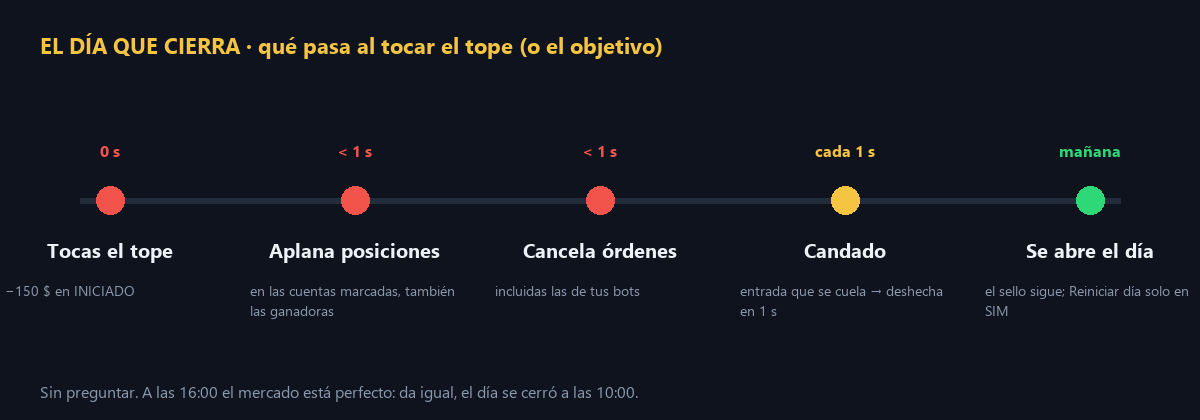
It's 10:00 and the market looks perfect at 16:00: doesn't matter. The day closed at 10:00. There's another one tomorrow. The Reset day (Reiniciar día) button only works on SIM accounts, for training.
8Support rescue
A sealed plan only opens with a code the server calculates. It doesn't exist on your machine.
- Copy the Challenge code for support from the panel: six letters and digits that change every day.
- Send it to [email protected] along with your key and the reason.
- Support sends you back an eight-character code. Type it into Apply support code (Aplicar código de soporte).
- The seal is removed. The plan stays unsealed until you press SEAL again. Nobody seals it for you. You keep your level.
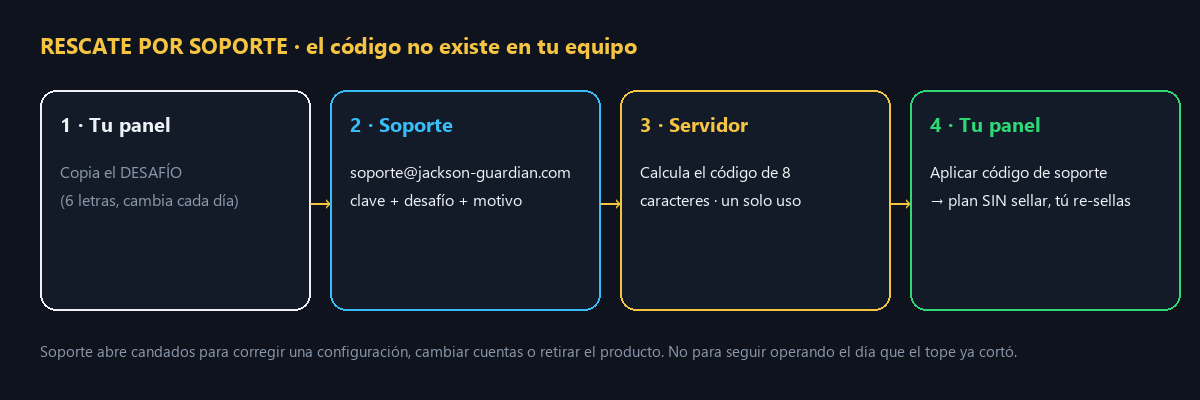
The code is single-use, only valid that day and on that machine. Support opens locks to fix a configuration, change accounts or remove the product. Not to keep trading on a day the daily loss cap already cut.
9Share your journal with your coach
If you have mentoring with Manuel Iragorri (La Zona Trade), your journal can reach him on its own.
- Tick Share my journal with my coach (Compartir mi cuaderno con mi coach) and type in the room code you were given (LAZONA).
- El Centinela checks that your key has active mentoring. If it does, every closed trade and every end of day reach your coach's panel within seconds. If it doesn't, it shows you the plan and sends nothing.
- You can untick it whenever you want, even while sealed: the box sits outside the seal.
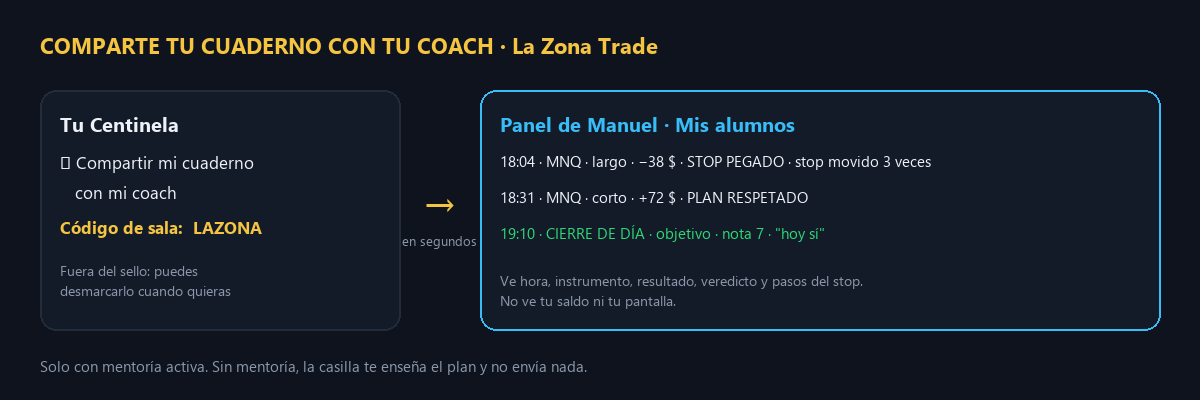
You see the same thing, and only yours, in My journal, with your chart and a place to ask Manuel specific questions. Your coach sees time, instrument, result, verdict and stop moves. He doesn't see your balance or your screen. No mentoring yet? Sign up here. When you sign up you get access to Manuel's private WhatsApp group by email.
10Move up a level
You can't start at the top and you can't skip. The sealed panel shows you what you're missing.
| Level | Trades/day | Contracts/day | Target | Daily loss cap | Streak / cool-down |
|---|---|---|---|---|---|
| 🌱 BEGINNER | 3 | 3 | +$150 | −$150 | 2 / 10 min |
| 🥈 AMATEUR | 2 | 4 | +$250 | −$180 | 2 / 15 min |
| ⚔️ ADVANCED | 1 (3 micros) | 3 | +$300 | −$210 | 1 / 20 min |
| 🎯 SNIPER | 1 | unlimited | +$300 | −$250 | 1 / 30 min · sniper mode |
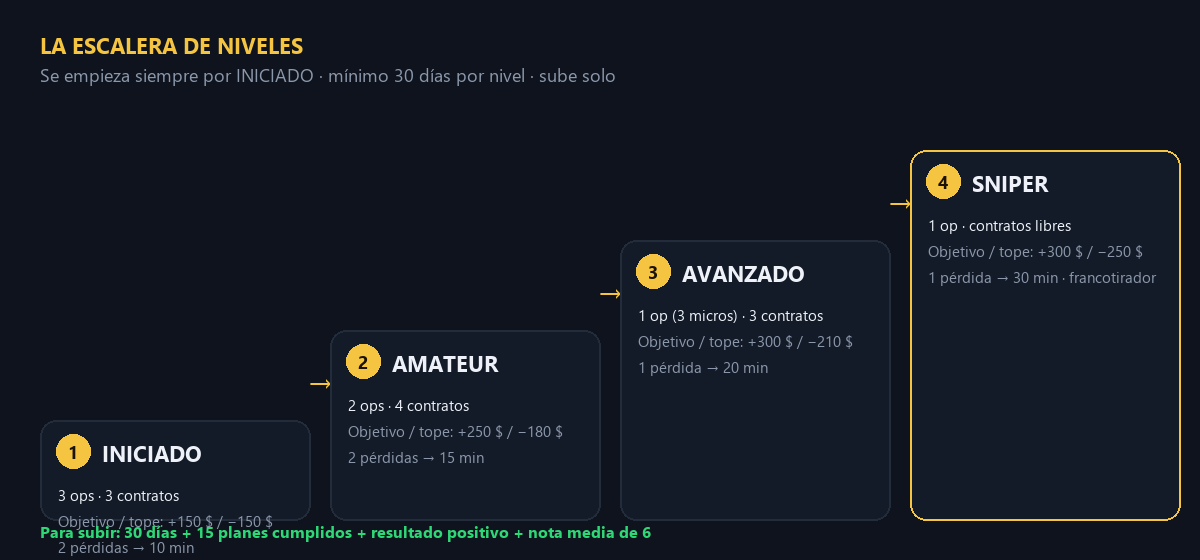
To move up: 30 days at the level, 15 plans completed (days closed by target or by daily loss cap without breaking the plan), positive result and an average grade of 6. When you get there, the Centinela promotes you on its own, applies the new numbers and seals again.
11Updates
- When NinjaTrader starts it checks for a new version and asks you.
- If you accept: it downloads, verifies the signature, closes NinjaTrader for a few seconds, installs and reopens it. Your plan, your seal, your license and your journal are never touched.
- Accept with no open positions, or with every position carrying a server-side stop.
- If something breaks, the file centinela-update.log in your NinjaTrader 8 folder (Documents) is what support will ask for.
12If something breaks
| What you see | What to do |
|---|---|
| The panel doesn't show under Tools | Close NinjaTrader completely and open it again. |
| "License rejected" | Key copied wrong, expired or already used on another machine. Write to support with your key. |
| It isn't counting my trades | The account isn't ticked, or the license isn't OK. |
| Full lockdown without hitting the daily loss cap | The sealed file has been tampered with or lost. Request the rescue (step 8). |
| I want to remove it | Unsealed: DESINSTALAR.bat and restart NinjaTrader. Sealed: rescue first. |
Support: [email protected]. For an error, a photo of the message and the file coach-log.txt from your NinjaTrader 8 folder (Documents).
Start with 5 days free →Back to El Centinela📄 PDF guide (Spanish)